 Open source
PracticePad
A macOS app for learning music by ear — slow it down, loop it, nail it.
Drop in a track, drag across the waveform to mark the four bars that keep beating you, and drill them at 50% speed until they are yours. Video files play their picture alongside the same controls, kept in sync with the pitch- and speed-shifted audio.
macOS 13 or later · Swift toolchain to build · GPL-3.0
Everything you need to learn a part
Built with SwiftUI and AVFoundation — an audio engine doing the time and pitch work, with the video picture slaved to the same clock.
Audio and Video
Open MP3, M4A, WAV, AIFF, MP4, M4V, or MOV. The audio track is played and processed even out of a video container.
Speed Without Pitch
Play from 0.25× to 2.0× with the pitch untouched, and quick 0.5× / 0.75× / 1× presets for the tempos you reach for most.
Pitch Without Speed
Transpose −12 to +12 semitones with the tempo untouched — match a horn chart, or drop a song to where you can actually sing it.
A-B Looping
Drag across the waveform to select a region and looping turns on automatically. The loop is gapless, so a passage repeats without a seam.
Waveform View
See the whole track at a glance, click anywhere to seek, and fine-tune a loop by dragging the A and B handles.
Video Playback
Video files show the picture in a pane you can resize or send full screen, staying in sync with the processed audio and reseeking at each loop wrap.
Drag and Drop
Drop a supported file onto the window to load it, and reopen anything you had before from File ▸ Open Recent.
Remembers Your Setup
Speed, pitch, the last file, its loop region, and the video pane size all come back on the next launch.
One window, no menus to hunt through
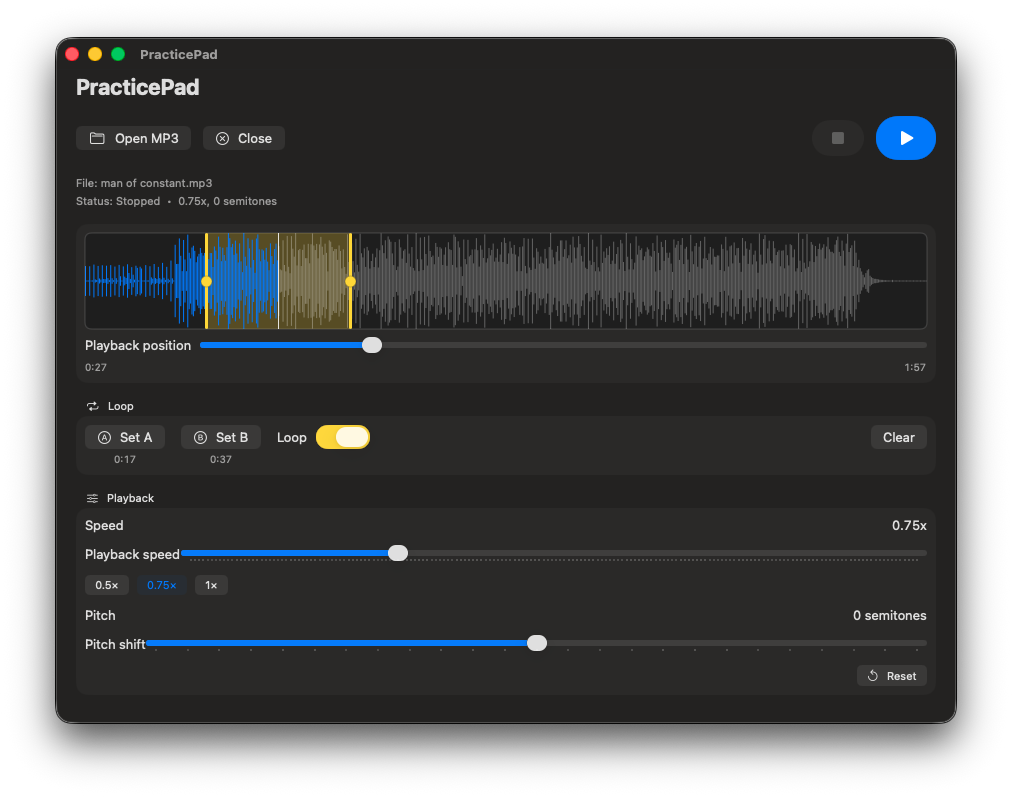
Waveform, transport, speed, pitch, and the loop controls are all on screen at once — because you are holding an instrument, not a mouse.
Load a track
Click Open (⌘O) or drag an audio or video file onto the window. Anything you had before is under File ▸ Open Recent.
Mark the hard part
Drag across the waveform to select a region — looping turns on automatically. Nudge the A and B handles until the loop sits exactly where you want it.
Slow it down
Pull the speed slider to 0.5× and the pitch stays put. Reset (⌘R) puts speed and pitch back to normal when you are ready for tempo.
Keyboard shortcuts
Enough to run a practice session without putting the instrument down.
- ⌘O
- Open a file
- Space
- Play / Pause
- ⌘.
- Stop
- ⌘R
- Reset speed & pitch
- Esc
- Exit full-screen video
Get the source
There is no signed binary release yet. Clone the repository and the packaging script hands you an app you can drag into Applications.
git clone https://github.com/PermanentWaves/PracticePad.git
cd PracticePad
./scripts/make_app.sh
cp -R dist/PracticePad.app /Applications/
Requires macOS 13 or later · Swift toolchain to build. The bundle is ad-hoc signed, which is fine on your own machine — running it on another Mac would need a Developer ID signature and notarization.
PermanentWaves/PracticePadFrequently asked questions
Is PracticePad free?
Yes. PracticePad is open source under the GPL-3.0 license. The source is on GitHub and you can build it yourself.
Where do I download it?
There is no signed binary release yet. Clone the repository and run ./scripts/make_app.sh, which produces an ad-hoc-signed dist/PracticePad.app you can drag into /Applications.
What files can it open?
MP3, M4A, WAV, AIFF for audio, and MP4, M4V, MOV for video. Video files get their picture in a resizable pane alongside the practice controls.
Does slowing a track down change its pitch?
No. Speed and pitch are independent — AVAudioUnitTimePitch handles each without touching the other, so a solo at 0.5× is still in the original key.
What do I need to build it?
macOS 13 or later and a Swift toolchain (Xcode or the Swift command-line tools). Use the packaged app rather than swift run — menus and keyboard shortcuts only exist in the .app bundle.